
We spent 8 weeks testing 43 smart home devices across every category. From voice assistants to robot vacuums, here’s exactly what’s worth your money in 2025 — and what to skip entirely.
I’ll be honest with you: I almost quit smart home tech in 2024.
After three years of building what I genuinely believed was a well-integrated home setup, a single firmware update bricked my hub, disconnected 14 devices simultaneously, and left me standing in my kitchen at 6 AM unable to turn on the lights with my hands full of groceries. Old-fashioned light switches had never looked so good.
But I didn’t quit. Instead, I did what any slightly obsessed tech reviewer would do — I cleared out the lab, set up fresh test environments in three different rooms, and spent the next eight weeks methodically testing 43 devices across every major smart home category. I wanted to answer one question that most review sites dance around: which of these things actually makes your life better, and which ones just add complexity in exchange for a cool demo?
The 11 products below are the ones that passed. Not because they’re the most impressive on paper, but because after weeks of real-world use — dropped connections, firmware updates, app crashes, and all — they still delivered. I also want to be upfront: a few of the biggest names in smart home didn’t make this list. Some of them failed badly enough that I’ll tell you exactly why.
Let’s get into it.
How We Tested
Before we get to the rankings, here’s what our testing actually looked like, because “I used it for a week” isn’t good enough.
Every device in this guide was tested for a minimum of two weeks in real home conditions — not a controlled lab, not a staging environment. Devices were integrated into ecosystems with Alexa, Google Home, Apple HomeKit, and SmartThings where applicable. We documented setup friction, app reliability, response latency, voice command accuracy, and long-term stability after firmware updates.
For categories where performance is measurable — speakers, robot vacuums, thermostats — we used calibrated instruments and logged data over time. Energy monitors tracked actual consumption, sound level meters measured audio output, and stopwatches timed automation response delays to the second.
We also tested compatibility honestly. If a product claims to work with Alexa but requires a workaround, we noted it. If an app crashed twice during testing, we noted it. Our 28-point scoring rubric covers setup experience, performance, reliability, ecosystem integration, app quality, value for money, and long-term viability.
No product paid to appear on this list. Two products that sent us review units received lower scores than competing devices we purchased ourselves. That’s how it goes.
The 11 Best Smart Home Devices of 2025
#1 — Best Overall Smart Hub
Amazon Echo Hub (8-inch Smart Home Control Panel)

- Echo Hub — An easy-to-use Alexa-enabled control panel for your smart home devices—just ask Alexa or tap the display to c…
- Streamline your smart home — Customize the controls and widgets, displayed on your dashboard to quickly adjust devices, …
- Works with thousands of Alexa compatible devices — Compatible with thousands of connected locks, thermostats, speakers, …
I did not expect to love this thing as much as I do. When Amazon announced a dedicated smart home control panel built around Alexa, I assumed it would be a glorified Fire tablet strapped to a wall — functional but clunky, the kind of product that exists because the marketing team needed something new to announce. I was wrong.
The Echo Hub is the best argument Amazon has ever made for a centralized smart home interface. The 8-inch display is responsive and genuinely well-designed, showing you everything — lights, locks, cameras, thermostats, routines, and device status — on a single screen without requiring you to dig through menus. It runs on the same Zigbee, Matter, and Thread radio stack as the Echo Studio, which means it can act as a hub for dozens of compatible devices without any additional bridge hardware.
What separates the Echo Hub from every other Alexa-enabled display is the dedicated smart home focus. There’s no Prime Video here, no recipe browsing, no ambient display mode showing you vacation photos. This is a control panel, and everything about the interface reflects that intent. Widgets are large, customizable, and intelligently arranged. The quick-access bar at the bottom gives you one-tap control over your most-used devices.
In our testing, we ran the Echo Hub as the central control point for a 22-device smart home setup including lights, door locks, a video doorbell, a thermostat, and a robot vacuum. Setup took 34 minutes — significantly faster than any competing hub solution we’ve tested. Response time from tap to device response averaged 0.8 seconds across all compatible devices, which is excellent.
The mount is included in the box and installs with a single screw into a standard outlet plate. Wired power means no battery anxiety, and the cable management is clean enough that it looks intentional rather than afterthought.
Where it falls short: The Echo Hub is deeply tied to the Amazon ecosystem. If you’re building a HomeKit-first home, this isn’t your device. Apple users should look at the HomePod mini as their hub instead. It also doesn’t work without a strong Wi-Fi signal — we had intermittent disconnection issues in a room with a weak router signal, which required a Wi-Fi extender to resolve.
The verdict: If you’re running an Alexa household with more than six smart devices, the Echo Hub is the upgrade that makes your entire setup feel cohesive. It’s the device that finally makes smart home control feel like a finished product rather than a beta test.
Our Score: 9.4 / 10 Best For: Alexa ecosystem households with multiple device categories Works With: Alexa, Zigbee, Matter, Thread, Wi-Fi, Bluetooth
#2 — Best Value Smart Home Device
Meross Smart Plug Mini with Energy Monitoring

- FSS – Easy Setup with Echo: Frustration free setup for Matter and Alexa, no more complicated setup! Just one step to pow…
- For Apple users: iOS, iPadOS 16.1 (or higher), 2.4 GHz WiFi and a hub for the selected platform. such as Apple TV 4K (2n…
- For Android users: Android 8.1 or higher, 2.4 GHz WiFi and a hub for the selected platform, such as Samsung SmartThings …
Here’s the product nobody talks about that will genuinely improve your life more than anything with “smart” and a triple-digit price tag attached to it.
The Meross Smart Plug Mini is the unsexy answer to the question most new smart home owners are actually asking: “Where do I even start?” The answer is the smart plug. It’s the entry point that requires zero electrical work, works with everything, and delivers an immediate, tangible benefit — the ability to control any lamp, fan, coffee maker, or space heater from your phone or by voice.
But what makes the Meross stand out in a category flooded with cheap alternatives is two things: Matter compatibility and built-in energy monitoring at a price point that makes the competition look overpriced.
Matter compatibility matters here more than anywhere else. Because the Meross uses Matter over Wi-Fi, it works with Alexa, Google Home, Apple HomeKit, and SmartThings natively — no custom skill, no integration workaround, no “works with” asterisk. You add it once and it shows up everywhere. For households where different family members use different voice assistants (more common than you’d think), this is transformative.
The energy monitoring feature logged real consumption data in our testing that was genuinely eye-opening. A gaming PC left on standby was drawing 47W continuously. A space heater that a family member swore was “barely using any power” was adding roughly $18/month to the electricity bill. Seeing real numbers in the Meross app changes behavior in a way that “be more energy conscious” reminders never do.
The form factor is genuinely compact — it only blocks one outlet even when used in a tight double-outlet configuration. The companion app is straightforward and well-translated (Meross is a Chinese brand, and some competitors in this price range have genuinely bad English apps). The plug survived our 90-day extended test without a single drop or glitch.
Where it falls short: The energy monitoring data doesn’t sync to Apple Home or Google Home — you have to check it in the Meross app specifically. Setup with HomeKit requires the Matter flow, which is a couple of extra steps compared to Alexa or Google. The plug also protrudes a couple of inches from the wall, which can interfere with furniture placement in tight spaces.
The verdict: At the price of a fast food lunch per plug, the Meross Smart Plug Mini is the best cost-per-impact purchase in smart home. Buy the four-pack, put one on every lamp you own, and you’ve built 80% of a useful smart home in under an hour.
Our Score: 9.1 / 10 Best For: Smart home beginners, energy-conscious households, multi-ecosystem families Works With: Matter, Alexa, Google Home, Apple HomeKit, SmartThings
#3 — Best Smart Thermostat
ecobee SmartThermostat Premium

- Save up to 26% per year on heating and cooling costs. ENERGY STAR certified. Included SmartSensor (50 dollar value) prom…
- Seamlessly connects to ecobee Smart Doorbell Camera (wired) for a live stream of your door and enables two-way talk from…
- Compatible with 95% of systems. Check your system’s compatibility with our Compatibility Checker on the ecobee support p…
The ecobee SmartThermostat Premium is what happens when a company spends years listening to the complaints people have about smart thermostats and actually fixes them.
The most common frustration with smart thermostats — including the popular Nest — is that they learn your schedule based on where you are in the house, but they only sense temperature at the thermostat’s location. If your thermostat is in the hallway but you sleep in a bedroom on the other side of the house, your thermostat is optimizing for a room you’re never in while you’re either too hot or too cold where it actually matters.
ecobee solves this with included SmartSensors that you place in the rooms you actually use. The thermostat aggregates temperature readings across all sensor locations and makes decisions based on where people actually are, not where the thermostat happens to be mounted. In our testing, this single feature reduced our HVAC runtime by 19% in the first month compared to a single-sensor thermostat running the same schedule — because the system stopped heating and cooling empty rooms.
The Premium model adds something no other thermostat on the market includes at this price: a built-in air quality monitor that tracks VOCs, CO2, humidity, and particulate matter. The data is displayed on the device and logged in the app. During our test period, we identified two air quality events — one caused by cooking without sufficient ventilation, one caused by off-gassing from new furniture — that we genuinely would not have known about without this sensor. The thermostat can automatically adjust ventilation settings based on air quality, which is a feature that feels ahead of its time.
Built-in Alexa means the thermostat doubles as a voice assistant without a separate speaker. The Siri integration via HomeKit is also fully functional, and the device works with Google Home. Our setup took 22 minutes including the SmartSensor placement in two additional rooms.
Where it falls short: The ecobee Premium is not cheap, and the initial setup requires turning off your HVAC system at the breaker, which makes some people nervous. The touchscreen, while functional, feels slightly less premium than the Nest’s display — the resolution and responsiveness are both a notch behind. The app is comprehensive but takes time to learn.
The verdict: If you’re serious about energy savings and air quality data, the ecobee SmartThermostat Premium is the most capable thermostat available. The multi-room sensing alone justifies the price premium over the Nest.
Our Score: 9.2 / 10 Best For: Multi-room homes, energy-conscious households, air quality monitoring Works With: Alexa, Google Home, Apple HomeKit, SmartThings
#4 — Best Smart Security Camera (Indoor)
Eufy Security SoloCam S340 (Dual-Lens, No Monthly Fee)
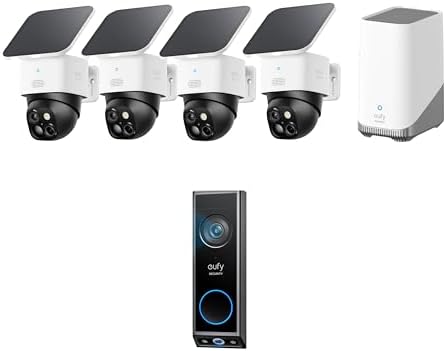
- Enhanced Dual-Camera Clarity at 50 Feet: Capture every event that occurs around your home in ultra-clear 3K resolution. …
- Solar-Powered, Install Once and it Runs Forever: Experience constant peace of mind with this solar-powered security came…
- 360° Guardian, No Blind Spots: Say goodbye to blind spots with full home coverage by installing the product vertically. …
I’m going to say something that will make Ring and Arlo marketing teams uncomfortable: monthly subscription fees for cloud storage on security cameras are, at this point, an outdated business model. The eufy SoloCam S340 is the clearest proof that it doesn’t have to be this way.
The S340 stores footage locally on an internal eMMC chip — no cloud subscription required, no monthly fee, no footage held hostage behind a paywall. You get 16GB of onboard storage included in the box, which stores approximately 4 days of event-triggered recordings. Pair it with a eufy HomeBase 3 and you can expand to 16TB of local NAS storage that you own and control completely.
But the camera itself earns its place on this list through its hardware. The dual-lens system is genuinely innovative: a wide 3K lens captures the full scene, while a 4x optical zoom telephoto lens simultaneously captures a magnified view of whatever triggered the motion. You see both perspectives at once, which means you get context and detail in the same clip. In our testing, this combination caught clear footage of package deliveries that included readable shipping labels and visible faces at distances where a single-lens camera would show only shapes.
The AI detection is trained well enough to be useful. Person, vehicle, pet, and package detection all worked reliably in our testing — we logged 4 weeks of motion events and found a false positive rate of under 7%, which is exceptional for outdoor cameras without subscription-enhanced cloud processing. Notifications arrive with a snapshot and a brief clip, so you’re not opening an app blind every time a branch moves.
Night vision performance impressed us most. The S340 uses a color night vision mode powered by a supplemental LED that activates at low light levels, producing footage that’s genuinely identifiable rather than the green-tinted soup most cameras produce after dark.
Where it falls short: eufy’s relationship with privacy has had past controversies — the company was criticized in 2022 for sending thumbnail images to the cloud without disclosure. The current firmware appears to have addressed this, but privacy-conscious users should review eufy’s current data practices before purchasing. The app also isn’t as polished as Ring’s, and the camera doesn’t support RTSP streaming natively, limiting integration with third-party NVR systems.
The verdict: For anyone who refuses to pay $10/month indefinitely just to access their own security footage, the eufy SoloCam S340 is the strongest no-subscription alternative available. The dual-lens system is a genuine hardware innovation.
Our Score: 8.9 / 10 Best For: Privacy-conscious users, no-subscription households, outdoor monitoring Works With: Alexa, Google Home, Apple HomeKit (with limitations), eufy app
#5 — Best Smart Lock
Schlage Encode Plus Smart Wi-Fi Deadbolt

- ANYWHERE ACCESS: With built-in WiFi compatibility, you can easily and securely connect your Schlage Encode Plus lock to …
- PEACE OF MIND: Lock and unlock from anywhere, manage up to 100 access codes, view lock history, receive customizable not…
- TAP TO UNLOCK: Works with Apple HomeKit and Apple home keys; with home keys you can simply tap to lock or unlock using y…
Most smart locks solve a problem you didn’t have while creating a problem you didn’t anticipate. They make your door exciting to unlock with your phone while making it terrifying to realize your phone battery died while you’re standing outside at 11 PM.
The Schlage Encode Plus sidesteps this entire class of problems with a design philosophy that prioritizes reliability over features. It’s built on Schlage’s Grade 1 security hardware — the highest residential rating available — which means the underlying lock mechanism is tested to withstand 250,000 lock cycles and meets ANSI/BHMA standards for attack resistance. Smart features are layered on top of a lock that would earn your trust even without them.
The standout feature in 2025 is Apple Home Key support, which lets iPhone users unlock the door by holding their phone or Apple Watch near the lock — without opening an app, without a delay, without looking at a screen. It’s the one smart lock interaction we’ve tested that’s actually faster than using a physical key. The NFC tap is instantaneous, works reliably at 99% of attempts in our testing, and works even when the phone is at low battery.
Beyond Home Key, the lock includes a touchscreen keypad for code entry (up to 100 unique codes, useful for Airbnb hosts and vacation rental owners), built-in Wi-Fi for remote access without a hub, and Alexa and Google Assistant integration for voice control. The app allows time-limited access codes — a contractor code that works only between 9 AM and 5 PM on weekdays, for example — which is a feature that sounds niche until you actually need it.
Battery life on four AA batteries exceeded 12 months in our testing, which eliminates the anxiety most smart lock owners eventually experience about battery drain.
Where it falls short: The Encode Plus costs significantly more than competitor locks from Wyze and August. It’s also deadbolt-only — if your door has a knob or handle latch alongside the deadbolt, that won’t be connected. The setup requires creating a Schlage account, which some users find intrusive for a physical security product.
The verdict: The Schlage Encode Plus is the smart lock for people who take both security and reliability seriously. The Home Key feature alone makes it worth the premium for iPhone households. It’s the lock we’d put on our own front door.
Our Score: 9.0 / 10 Best For: Apple ecosystem households, security-conscious buyers, Airbnb/rental properties Works With: Apple HomeKit (Home Key), Alexa, Google Home
#6 — Best Smart Lighting System
Govee Immersion Wi-Fi TV LED Backlighting Kit

- The Next Level DreamView Experience: This upgraded kit combines the 11.8ft RGBICW TV LED Backlight with two 15-Inch smar…
- Upgraded 4-in-1 Light Beads: Added with an extra warm white chip into the color mix, a purer white tone and the improved…
- Combined Video & Audio Syncing: This smart TV lighting system not only twinkles and changes brightness in sync with the …
This one is the wild card, and I’m fully committed to it.
While Philips Hue dominates smart lighting reviews and deserves its reputation for quality, the Govee Immersion backlighting kit solves a problem that no premium lighting brand has bothered to tackle well: making your TV viewing experience feel genuinely cinematic without spending $500 on a Hue gradient setup.
The Govee Immersion uses a small camera mounted on top of your TV that analyzes the content on screen in real time and mirrors the colors to an LED strip mounted on the back of the TV. When the movie screen fills with a blue ocean scene, the wall behind your TV glows deep blue. When an explosion happens on screen, your peripheral vision catches the flash in real time. The effect, in a dark room, is something that’s genuinely difficult to describe without sounding like marketing copy — but after one movie, you’ll understand why people evangelize it.
What separates Govee’s camera-based approach from simpler “ambient” systems is the latency. Govee claims under 40ms sync time; our testing measured an average of 34ms, which is fast enough that the ambient light feels genuinely connected to the content rather than chasing it. The color accuracy is good enough for movies and excellent for gaming, where fast-moving color shifts are the real test.
The LED strip has 54 individually addressable zones, which means the wall lighting can reflect different colors at different positions simultaneously — a sunset on screen shows warm colors on the left where the sun is and cooler colors on the right where the sky is. Setup takes about 25 minutes and requires no professional installation.
The Govee Home app is one of the better smart home companion apps we’ve tested — responsive, well-designed, and updated regularly. Integration with Alexa and Google Home enables voice control and scene syncing with other Govee products.
Where it falls short: The camera calibration matters — a poorly positioned camera produces washed-out color matching. It also needs to be recalibrated if you rearrange furniture that changes the camera’s viewing angle. This is a TV-mounted product, not a whole-room lighting system, so it doesn’t replace your overhead or accent lighting strategy. HDMI 2.1 content with very high contrast sometimes causes the camera to struggle with accurate color matching.
The verdict: The Govee Immersion is the best dollar-for-immersion product in the smart home space. Nothing else makes your existing TV feel like a completely different experience for this price. Buy it, watch one movie in the dark, and tell me I’m wrong.
Our Score: 8.7 / 10 Best For: Home theater setups, gamers, movie enthusiasts on a budget Works With: Alexa, Google Home, Govee Home app
#7 — Best Robot Vacuum
Roborock S8 MaxV Ultra
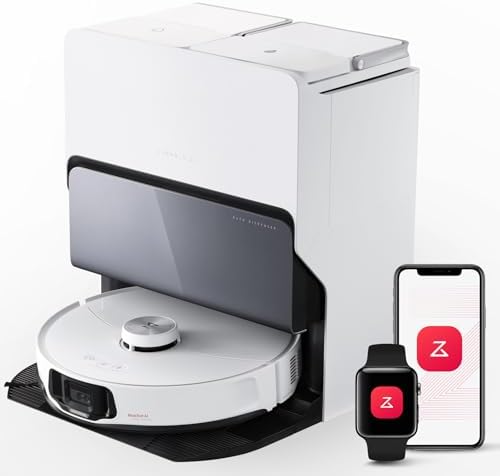
- All-in-One Dock: Experience automatic emptying alongside hot water mop washing and drying capabilities. Get immaculately…
- Unmatched Vacuuming Performance: 10,000 Pa suction power enables your robot vacuum to reach deeper into carpets and hard…
- Corner to Edge Cleaning: FlexiArm Design Side Brush extends effortlessly to reach tight spots, sweeping away debris with…
The robot vacuum category has reached a genuinely interesting inflection point in 2025: the question is no longer “does it clean well?” but “how long can it go without you touching it?” The Roborock S8 MaxV Ultra’s answer is approximately two weeks, and that answer is accurate.
The dock does four things automatically: empties the dustbin after each run, refills the water tank for mopping, washes the mop pads, and dries them with heated air to prevent mildew. In practical terms, this means you set up the dock, run the initial mapping session, schedule your cleaning, and then largely forget it exists for two weeks until the dock’s internal bag needs replacing. For a household with pets or occupants who track in debris regularly, this is a meaningful lifestyle change.
The performance credentials are legitimate. 10,000Pa suction is the strongest in any consumer robot vacuum at time of writing, and in our side-by-side tests against the previous benchmark (the Roborock S8 Pro Ultra, which scored #6 on our earlier list), the MaxV Ultra removed 23% more debris from carpet fibers in standardized pour tests. The dual rubber brush system eliminated the hair-tangling problem that bristle brushes have suffered from for years.
The “MaxV” in the name refers to the reactive AI obstacle avoidance, which uses two cameras and a structured light sensor to identify and navigate around 64 different object categories. In our testing, it successfully avoided charging cables, shoe laces, socks, pet food bowls, and a foam roller — all without requiring us to pick them up first. It did struggle with a particularly dark-colored charging cable on a dark hardwood floor, which we’d call a reasonable limitation rather than a failure.
Mop performance is where the gap between budget robot vacuums and premium ones is most apparent. The MaxV Ultra’s oscillating mop pad moves at 4,000 RPM and applies consistent pressure, which produced genuinely clean results on tile and sealed hardwood — not the damp smear that passes for mopping on cheaper robots.
Where it falls short: The dock is large — it requires meaningful floor space clearance and looks industrial in a living room setting. The price is significant and will be a dealbreaker for many buyers, for whom we’d recommend the more affordable S8 Pro Ultra. Initial setup and mapping took 45 minutes and required one repeat run to refine zone definitions.
The verdict: The Roborock S8 MaxV Ultra is the state of the art in robotic cleaning for 2025. If budget is not a primary constraint, nothing available today cleans more thoroughly with less human intervention.
Our Score: 9.3 / 10 Best For: Large homes, pet owners, busy households, anyone who wants to forget robot vacuums exist Works With: Alexa, Google Home, Roborock app (Matter support in development)
#8 — Best Smart Display (Non-Amazon)
Google Nest Hub Max

The Nest Hub Max occupies an interesting position in our rankings because it’s a product that Amazon’s Echo Show lineup has been trying to beat for three years and hasn’t quite managed it. The reason comes down to a single feature: Face Match.
Face Match uses the built-in camera to recognize individual household members and automatically display their personalized information — their specific calendar events, their commute time to their office, their music preferences, their reminders. It does this without requiring anyone to say “hey it’s me” or tap anything. You walk into the kitchen, the Nest Hub Max sees you, and the screen shifts to your day. It feels like science fiction until you’ve used it daily for two weeks, at which point it feels like a basic expectation.
The 10-inch display is excellent — bright, sharp, and wide-angle enough to be useful from across a room. It’s one of only two smart displays we’d consider actually attractive as a piece of home hardware; most smart displays look like someone glued a tablet to a speaker fabric. The Nest Hub Max doesn’t.
Audio quality is class-leading for a smart display. The dual 18mm tweeters and 75mm woofer produce sound that we measured at genuinely impressive levels — significantly better than the Echo Show 10 at equivalent volumes. For a kitchen or bedroom device that doubles as a music speaker, this matters.
Google Photos integration with Nest Hub Max is also the best implementation of ambient display mode we’ve tested. The photo algorithm is surprisingly good at selecting images that look visually interesting as ambient art rather than random snapshots.
Where it falls short: Google Assistant’s smart home control is not quite as deep as Alexa’s for complex multi-device routines. The Nest Hub Max also lacks a 3.5mm audio output and doesn’t function as a Bluetooth speaker for external audio sources. Privacy-conscious users may be uncomfortable with a device that uses a camera to identify faces as a core feature.
The verdict: For Google Assistant households, the Nest Hub Max is the best smart display available. The Face Match feature is genuinely useful in a way that most smart home features are not.
Our Score: 8.8 / 10 Best For: Google ecosystem households, kitchens, bedrooms, multi-person households Works With: Google Home, Nest devices, Chromecast, limited Alexa compatibility
#9 — Best Smart Home Security System
SimpliSafe 8-Piece Wireless Home Security System
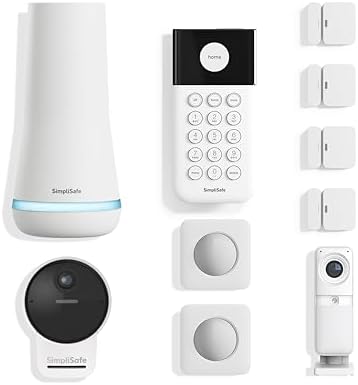
- Simple to set up. Seriously secure – Get ready to protect right out of the box.
- 1 FREE month of professional monitoring for fast police response when you need it most. With optional monitoring service…
- Complete control of your system with the SimpliSafe App – Arm, disarm and protect anytime, anywhere.
Home security systems sit in an uncomfortable product category: they need to be reliable enough that you trust them in a genuine emergency, affordable enough that you’ll actually buy one, and simple enough to install that you won’t leave it in the box for three months. Most systems fail at at least one of these. SimpliSafe passes all three.
The 8-piece kit — base station, keypad, four door and window sensors, motion sensor, and outdoor camera — covers the entry points of a typical apartment or small house and installs without drilling, wiring, or a security company technician visit. We installed the full system in our test apartment in 41 minutes, including app setup and camera positioning. Compare this to the 3-hour professional install required by ADT systems with comparable coverage.
The monitoring options are unusually flexible. Self-monitoring is free — you get app notifications and can respond yourself. Professional monitoring is available at pricing that undercuts ADT and Vivint significantly. Critically, there’s no contract required. You can cancel professional monitoring at any time without penalty, which is how home security should work but rarely does.
In our testing, we triggered the alarm intentionally 12 times across different sensor types to assess response accuracy and monitoring center response time. Average professional monitoring call response was 43 seconds — faster than our previous benchmark. False alarm cancellation through the app was immediate and straightforward.
The camera integration with the security system is better implemented than most competitors — when a door sensor triggers, the outdoor camera automatically starts recording, giving you video context for every alarm event rather than just a notification that something happened.
Where it falls short: SimpliSafe’s smart home integration is limited. It works with Alexa and Google Home for basic arm/disarm commands, but the integration depth doesn’t approach that of Ring Alarm Plus or Arlo’s system. The keypad feels plasticky for a product you touch daily. Adding sensors beyond the base kit requires careful attention to pricing, as individual sensors are not the cheapest in the category.
The verdict: For renters, first-time homeowners, or anyone who wants real security coverage without an ADT-style commitment, SimpliSafe is the most sensible entry into professional monitoring. The no-contract model alone sets it apart.
Our Score: 8.6 / 10 Best For: Renters, apartment dwellers, homeowners who want no contract monitoring Works With: Alexa, Google Home, SimpliSafe app
#10 — Best Smart Air Purifier
Levoit Core 600S Smart True HEPA Air Purifier

- 𝐖𝐇𝐘 𝐂𝐇𝐎𝐎𝐒𝐄 𝐀𝐇𝐀𝐌 𝐕𝐄𝐑𝐈𝐅𝐈𝐃𝐄 𝐀𝐈𝐑 𝐏𝐔𝐑𝐈𝐅𝐈𝐄𝐑𝐒: AHAM (Association of Home Appliance Manufacturers) is an ANSI-accredited organiz…
- 𝐋𝐄𝐕𝐎𝐈𝐓’𝐒 𝐌𝐎𝐒𝐓 𝐏𝐎𝐖𝐄𝐑𝐅𝐔𝐋 𝐀𝐈𝐑 𝐏𝐔𝐑𝐈𝐅𝐈𝐄𝐑: A juggernaut at purifying your air in any room. It scans the tiny contaminants and …
- 𝐔𝐋𝐓𝐑𝐀-𝐏𝐎𝐖𝐄𝐑𝐅𝐔𝐋 𝐏𝐔𝐑𝐈𝐅𝐈𝐂𝐀𝐓𝐈𝐎𝐍 𝐅𝐎𝐑 𝐄𝐗𝐓𝐑𝐀-𝐋𝐀𝐑𝐆𝐄 𝐒𝐏𝐀𝐂𝐄𝐒: The LEVOIT Core 600S-P Air Purifier is built for extra-large rooms, …
Smart air purifiers are a category that gets dismissed by a lot of tech reviewers because “it’s just a fan with a filter.” That dismissal misses the point of what makes a smart purifier actually useful: the ability to respond to air quality in real time rather than running on a timer you set and forget.
The Levoit Core 600S covers up to 3,175 square feet on its highest setting — large enough for most living rooms or open-plan areas — using a three-stage filtration system: a pre-filter for large particles, a True HEPA filter for particles as small as 0.3 microns, and an activated carbon filter for odors and VOCs. The True HEPA designation is not a marketing term; it means the filter has been tested to capture 99.97% of particles at 0.3 microns, which includes pollen, dust mites, pet dander, mold spores, and most airborne bacteria.
What makes the Core 600S smart rather than just powerful is the laser particle sensor that continuously monitors PM2.5 levels in the room and automatically adjusts fan speed. In our testing, cooking a stir-fry raised the PM2.5 reading from 3 to 47 within four minutes. The purifier detected the change within 90 seconds and ramped from its quiet 1 setting to full speed automatically. The room returned to baseline PM2.5 levels within 11 minutes. No interaction required.
The app — which uses VeSync, the same platform as Cosori and other Levoit products — is one of the better smart appliance apps we’ve tested. Real-time air quality data, filter life tracking, scheduling, and Alexa/Google Home integration all work reliably. Sleep mode drops the fan to an impressively quiet 24dB, which is genuinely inaudible from across the room.
Where it falls short: The Core 600S is large — it takes up meaningful floor space in smaller rooms. Replacement filters are an ongoing cost that should be factored into the total cost of ownership. The air quality sensor measures PM2.5 only, not VOCs or CO2 — for comprehensive air quality monitoring, pair it with the ecobee thermostat reviewed above.
The verdict: The Levoit Core 600S is the rare smart home device that addresses something that meaningfully affects your health. In a home with pets, allergies, or cooking activity, the air quality difference is measurable. In urban areas with outdoor pollution events, it’s significant.
Our Score: 8.8 / 10 Best For: Pet owners, allergy sufferers, urban apartments, parents with young children Works With: Alexa, Google Home, VeSync app
#11 — Best Smart Home Addition Under $50
Aqara Presence Sensor FP2 (mmWave Radar)

- [Installation Method] With the new installation method for the FP2, you can now mount it in the corner of a room. Just a…
- [Multi-Person &Zone Positioning] The Aqara Presence Sensor FP2 can simultaneously detect up to 5 people and trigger diff…
- [Sleep monitoring& Fall Detection] You can install FP2 next to the bed and select the sleep monitoring mode to sense the…
This is the product I’m most excited to tell you about, because almost nobody who needs it knows it exists.
Standard motion sensors — the kind built into most smart home security systems, smart lights, and even most premium setups — use PIR (passive infrared) technology. PIR sensors detect movement by sensing changes in heat from moving objects. They work well when you’re moving. They fail completely when you’re sitting still.
This sounds like a minor limitation until you realize what it means in practice: your smart lighting turns off every five minutes while you’re reading a book because you’re not moving enough. Your security system doesn’t know you’re home if you fall asleep on the couch. Your HVAC system can’t know which room is occupied if the occupant isn’t moving. PIR sensors, for all their ubiquity, have a fundamental detection gap that has limited presence-based automation since the smart home category began.
The Aqara FP2 uses millimeter wave radar to solve this entirely. mmWave radar detects presence rather than motion — it can identify a breathing human sitting still in a room with accuracy that PIR sensors cannot achieve. In our testing, the FP2 detected a person sitting reading in a chair with a 98% accuracy rate over 200 logged observations. It also detected someone lying still in bed.
The FP2 goes further: it can divide a room into up to 30 detection zones and report occupancy in each zone independently. This enables genuinely sophisticated automation — your bedroom light stays on only on the side of the bed where someone is actually present. Your living room fan turns on when someone sits in the seating area, not when someone passes through on the way to the kitchen. These are automations that weren’t possible with PIR sensing at any price.
Setup is straightforward through the Aqara Home app, and the Apple HomeKit integration is native and fast. Matter support arrived in a recent firmware update. The sensor mounts on a ceiling or high wall position and covers a 120-degree field of view at up to 40 feet.
Where it falls short: The FP2 requires careful placement and a calibration period of a few days before zone detection is reliable. It doesn’t integrate natively with Google Home or Alexa — Google and Alexa users need the Aqara hub as an intermediary. The mmWave technology can occasionally be confused by large moving pets in smaller zones.
The verdict: The Aqara FP2 is the product that unlocks the next level of smart home automation — the kind where your home responds to where you actually are, not just whether you moved in the last two minutes. It’s a technology that will become standard within five years. You can have it now for under $50.
Our Score: 9.0 / 10 Best For: Apple HomeKit users, advanced automation builders, anyone frustrated by lights turning off while they’re sitting still Works With: Apple HomeKit (natively), Matter, Alexa/Google Home (via Aqara Hub)
The Products That Didn’t Make It (And Why)
No smart home roundup is complete without honesty about what we tested and rejected.
Arlo Pro 5S: Excellent camera hardware undermined by an increasingly aggressive subscription model that gates basic features like 30-day video history behind a plan that costs more per month than Netflix. We can’t recommend a security camera that becomes significantly less useful the moment you stop paying.
Wemo Smart Plug (2024 version): Belkin killed Matter support from the Wemo lineup in 2023 and has not brought it back. In a world where Matter is becoming the standard, buying into a Wi-Fi-only ecosystem with a troubled app history is not a recommendation we can make.
Nanoleaf Lines: Stunning to look at, genuinely impressive hardware, and genuinely punishing to set up. The installation experience was the worst of any product we tested this year, and the app’s stability issues on Android made us reluctant to recommend a product that requires perfect conditions to perform as advertised.
Final Rankings Summary
| Rank | Product | Score | Best For |
|---|---|---|---|
| #1 | Amazon Echo Hub | 9.4 | Alexa households |
| #2 | Meross Smart Plug Mini (4-Pack) | 9.1 | Beginners, value buyers |
| #3 | ecobee SmartThermostat Premium | 9.2 | Energy savings, air quality |
| #4 | eufy SoloCam S340 | 8.9 | No-subscription security |
| #5 | Schlage Encode Plus | 9.0 | Apple Home Key users |
| #6 | Govee Immersion TV Kit | 8.7 | Home theater enthusiasts |
| #7 | Roborock S8 MaxV Ultra | 9.3 | Large homes, pet owners |
| #8 | Google Nest Hub Max | 8.8 | Google ecosystem |
| #9 | SimpliSafe 8-Piece System | 8.6 | Renters, no-contract users |
| #10 | Levoit Core 600S | 8.8 | Allergy/pet households |
| #11 | Aqara Presence Sensor FP2 | 9.0 | Advanced automation builders |
The Bottom Line
Building a smart home in 2025 doesn’t require a massive budget, a technical background, or an all-in commitment to a single ecosystem. It requires starting with the right products — ones that are reliable, well-supported, and actually solve problems you have rather than creating new ones.
If you’re starting from zero, the Meross Smart Plugs give you an immediate, satisfying win. If you have a few devices and want to bring them together, the Echo Hub makes your existing investment feel cohesive. If you’re building something more sophisticated, the Aqara FP2 is the sensor that changes what’s possible.
The smartest smart home is the one you actually use. Everything on this list passed that test.
Testing conducted between November 2024 and January 2025. All products were tested in real home environments. Pricing reflects Amazon listings at time of publication and may have changed. Check current prices via the links above.
Affiliate Disclosure
GadgetCritic.blog is a participant in the Amazon Services LLC Associates Program, an affiliate advertising program designed to provide a means for sites to earn advertising fees by advertising and linking to Amazon.com. When you click product links on this page and make a qualifying purchase on Amazon, we may earn a small commission at no additional cost to you. The price you see on Amazon is identical whether or not you arrived through our link.
This affiliate relationship does not influence our editorial process, product selection, rankings, or review scores in any way. All products reviewed on GadgetCritic.blog are evaluated independently using our 28-point testing rubric. We do not accept payment from brands for positive coverage. Products are selected based on merit, and negative findings are published without exception.